

A delay of one second does not seem like a deal until you see the effect it actually has. Google did some research. Found out that when websites load a little bit faster it can make a big difference in how many people buy something and how much money they spend. This is not because people get excited about websites but because they get impatient and leave when they have to wait. By 2026, Google has made clear that speed isn’t just something developers need to worry about it’s something that can affect how high a website shows up in search results and how much money it makes. Speed is very important for websites, like Google.
Why Speed Matters More Than It Used To
Google uses a specific set of metrics called Core Web Vitals to judge how a real visitor experiences your site, and they’re now a confirmed ranking signal a tiebreaker when two pages have similar content quality, where the faster one consistently wins the higher spot. But the revenue case is just as stark as the rankings one: even a fraction of a second delay has been shown to noticeably reduce conversions. A handful of major companies that fixed their loading performance saw double-digit gains in sales and revenue per visitor as a direct result with no other changes involved.
Core Web Vitals, in Plain English
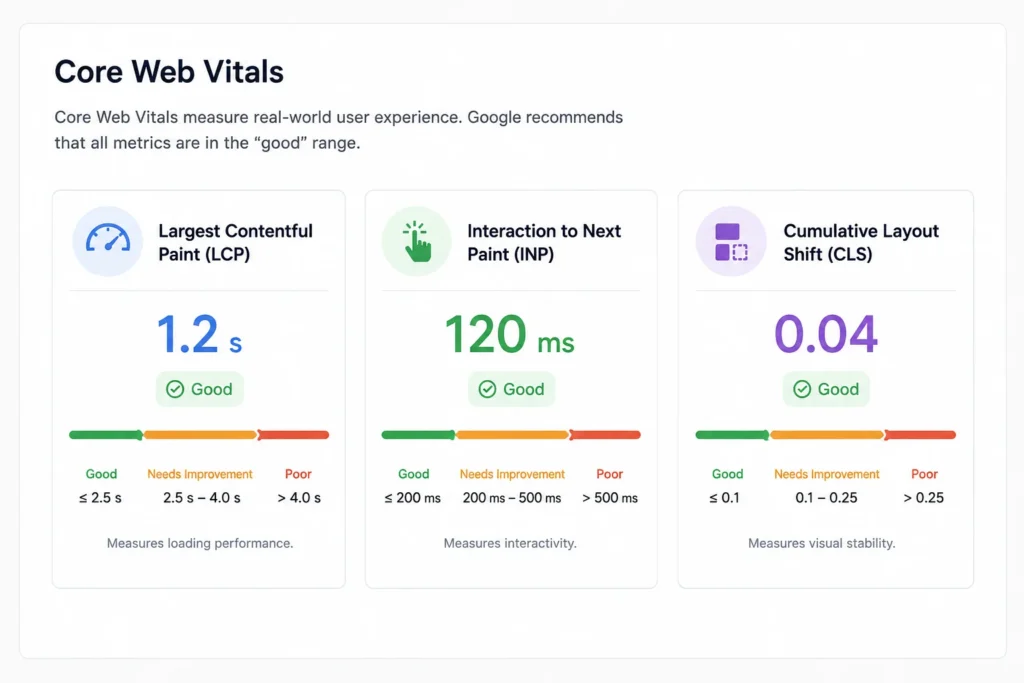
Largest Contentful Paint (LCP) is the time until the main content of the page is visible. They are looking at sub 2.5 second and some of the current guidance is getting even tighter towards 2.0 seconds. The usual suspects are slow server response times and render-blocking scripts.
Interaction to Next Paint (INP) measures the responsiveness of a page across all interactions during a visit, rather than just the first click. A “good” score is under 200 milliseconds. Heavy JavaScript is usually the culprit it blocks the main thread of the browser. Think of a single-lane road where one heavy task blocks every other action from passing through.
Cumulative Layout Shift (CLS) measures visual stability whether elements jump around as a page loads. A good score is under 0.1. This is usually caused by images or ads without defined dimensions, or a cookie banner that pushes content around after the page has already started rendering.
What to Fix First
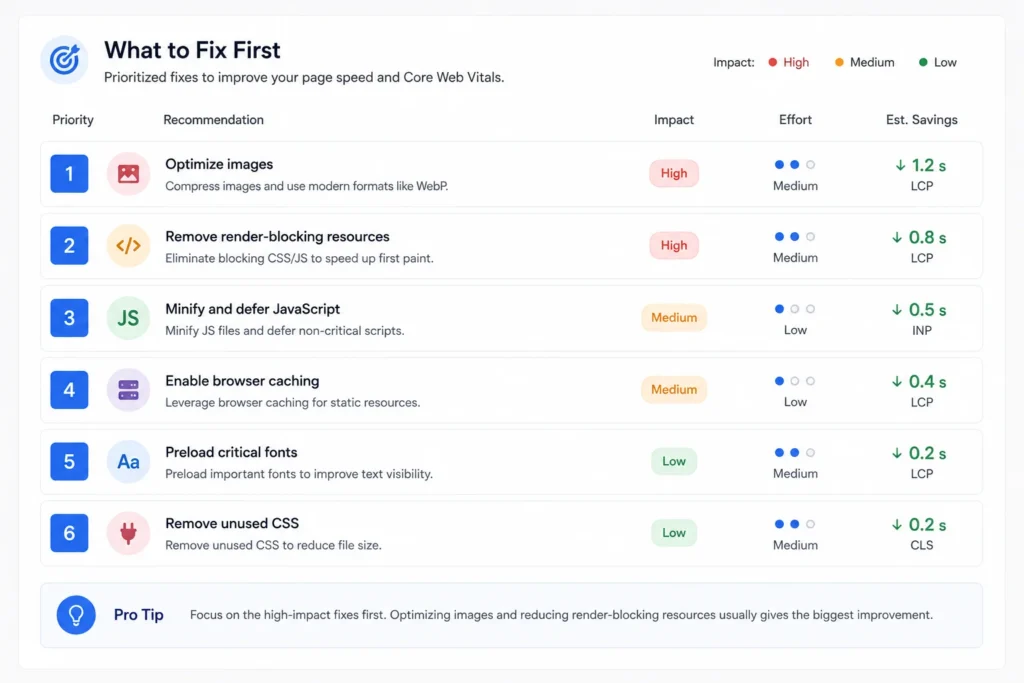
Images, almost always. Images account for 50-70% of total page weight on most sites, so it’s the biggest impact fix you’ll find. Use modern formats like WebP or AVIF (25-50% smaller than JPEG or PNG at similar quality). Make your main hero image high priority, so the browser loads it first instead of any other asset on the page.
Server response time. No amount of front-end optimization will ever make up for a server that’s taking more than 600 milliseconds to respond. This is often where shared hosting struggles . Managed hosting, a VPS, or a proper CDN usually solves it directly.
Unnecessary JavaScript and third-party scripts. Each new plugin, tracking script or widget you add adds more weight, and more potential road blocks to interaction. Audit what you actually have on your site and delete anything that’s not earning its keep.
Layout stability basics. Set explicit width and height on images and embeds, and make sure cookie banners or promotional bars don’t shift content around after the page has already loaded.
Caching and a CDN. Caching stores content so repeat visits load faster, and a CDN serves your site from servers physically closer to each visitor both are relatively simple wins with a real impact on load time, especially for visitors outside your primary market.
The WordPress-Specific Problem
WordPress sites are especially prone to poor Core Web Vitals scores, almost always from plugin overload and heavy, unoptimized themes. Every plugin brings some performance cost. That cost grows quickly once a site has a dozen of them. Keep plugins to what’s truly needed pick a theme that is light and focused on performance and use special plugins for caching and optimizing images instead of letting each plugin manage its own assets in a slow way.
How to Actually Measure This
Google Search Console Core Web Vitals report gives user data that comes from actual visits. The data is split into three parts: Good Needs Improvement and Poor. This is the source because it shows what real visitors actually went through not what a test showed. PageSpeed Insights takes that data and adds a lab test that is done in a controlled environment. It then offers important suggestions for your particular page. Check this at once a month. If you are making changes, to your site or running campaigns check it once a week. Performance can change slowly over time as new images and scripts are added.
The Business Case, Not Just the Technical One
Mobile performance deserves specific attention, since mobile traffic now makes up the majority of visits, and Google evaluates the mobile version of your site first for ranking purposes regardless of how your desktop version performs. A fast desktop experience sitting on top of a slow mobile one is still, functionally, a slow website from Google’s perspective and from the perspective of most of your actual visitors.
Frequently Asked Questions
Unoptimized images, in the large majority of cases. They typically account for the majority of a page’s total weight, which makes image compression and modern formats the highest-impact fix for most sites.
We need to make sure that Largest Contentful Paint is really fast it should be under 2.5 seconds. Actually the goal is to get it faster under 2.0 seconds. If the Largest Contentful Paint takes, than 4 seconds that is bad it hurts the Largest Contentful Paint rankings and conversions. The Largest Contentful Paint needs to be quick so it does not hurt the website.
Yes, directly. Core Web Vitals are something that Google uses to decide how to rank websites. When two websites have content Core Web Vitals can be the thing that sets them apart. The website that loads faster will usually get a position. This is because Google wants to show people the fastest websites so Core Web Vitals play a big role in this. Core Web Vitals are important for website owners to pay attention to because they can really affect how well their website does in Google rankings. Core Web Vitals are a part of getting a good position, on Google.
Some fixes image compression, enabling caching, removing unused plugins are manageable without deep technical knowledge. Server-level issues, JavaScript optimization, and structural layout problems usually need a developer’s involvement.
Monthly at minimum through Google Search Console. If you’re actively changing the site or running marketing campaigns, check weekly, since performance can quietly degrade as new content and scripts get added.
Conclusion
Website speed isn’t a cosmetic technical metric anymore it’s directly tied to how well your site ranks and how many visitors actually convert once they arrive. Start with images, check your server response time, and measure with real data rather than guessing, and most sites see a meaningful improvement without needing a full rebuild.
If you’d like a speed audit for your own site, get in touch with GrowthLayerX for a free consultation we’ll show you exactly what’s slowing you down and what to fix first.
