Introduction
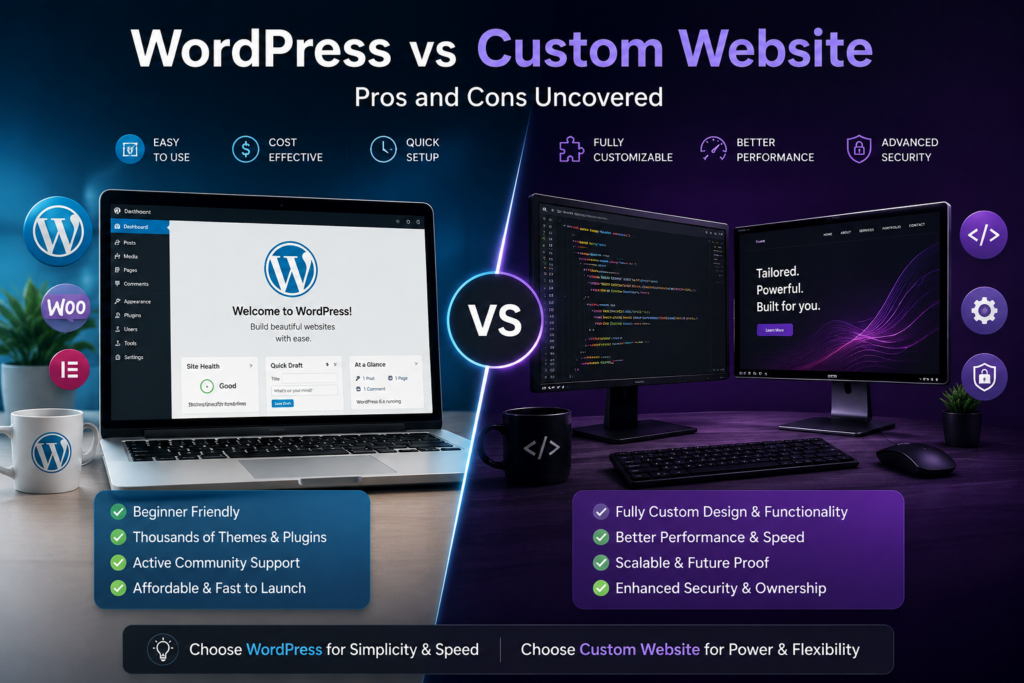
WordPress is a popular Content Management System (CMS) that allows for rapid, cost-effective site building using pre-designed templates and plugins. Custom websites
are built from scratch using programming languages like HTML, CSS, and JavaScript, offering total control over design and performance but at a much higher cost.
WordPress is generally superior for users needing a cost-effective, fast launch with easy content management, while custom websites are better for high-performance,
unique functionality and absolute control.
What is WordPress?
WordPress is a free, open-source content management system (CMS) that allows you to create, manage, and publish websites without needing to code. It powers over 43%
of all websites, from blogs to e-commerce stores, by offering thousands of customizable themes and functional plugins.
Key Concepts for Beginners
WordPress.org vs. WordPress.com:
WordPress.org (Self-Hosted):
You download free software, buy your own domain/hosting, and have 100% control and customization. This is the recommended route for professional sites.
WordPress.com (Hosted):
A service that hosts the site for you, offering a limited free plan and paid tiers.
What is a CMS?
A Content Management System is software that acts as a user-friendly
dashboard to create pages, post articles, and manage media without touching code.
Themes (The “Look”):
Themes determine your website’s layout, fonts, and colors. You can choose from thousands of free themes to customize your site’s appearance.
Plugins (The “Functions”):
Plugins are apps you add to your website to increase functionality, such as adding a contact form, an online store (WooCommerce), or security tools.
Ease of Use:
You can build a website using a “drag-and-drop” editor, making it accessible to beginners.
What is a Custom Website?
Custom website development is the process of building a unique website from scratch, specifically tailored to a business’s unique goals, branding, and functional
requirements, rather than using pre-made templates. It offers full control over design, superior performance, and scalability, allowing for custom workflows, API
integrations, and specialized user experiences.
Key Aspects of Custom Website Development:
Tailored Functionality:
Built around specific business logic (e.g., complex eCommerce, client portals), avoiding the limitations of themes or plugins.
Unique Design & Branding:
Every element, from layout to user interface (UI), is crafted to match brand identity, rather than using common templates.
Performance and SEO:
Clean code and lack of bloat lead to faster load speeds and better search engine optimization (SEO).
Ownership and Security:
Full ownership of code and data, which improves security and reduces dependency on third-party platforms.
WordPress vs Custom Website (Main Comparison)
Ease of Use
WordPress generally offers significantly higher ease of use for beginners and non-technical users, whereas custom websites are more complex but provide greater
control for developers.
WordPress Ease of Use:
User-Friendly Dashboard:
The WordPress.org dashboard allows users to manage posts, pages, and media with minimal effort.
Rapid Launch:
You can have a professional site running in days by using pre-designed WordPress Themes.
Extensive Help:
A massive community provides tutorials and forums for troubleshooting almost any issue.
SEO Tools:
Managing search visibility is straightforward with beginner-friendly tools like the Yoast SEO plugin.
Custom Website Ease of Use:
Bespoke Admin:
While the initial build is harder, developers can create a tailored administrative interface that focuses only on what you need.
Cleaner Architecture:
These sites avoid “plugin bloat,” which can make WordPress settings feel cluttered and overwhelming for some.
Expert Dependency:
The primary drawback for non-developers is the continuous need for technical assistance for minor updates or bug fixes.
Cost
WordPress websites generally have lower upfront costs ($500–$8,000) and faster development, making them ideal for small to medium businesses. Custom websites require
higher upfront investment ($5,000–$50,000+) but offer better performance and lower long-term maintenance costs, often becoming more cost-effective over 3–5 years.
Key Cost Factors:
WordPress:
Costs are driven by premium themes, plugins, and professional developer rates. The software is free, but hosting and security are ongoing expenses.
Custom:
Costs are driven by labor hours for custom design, development, and testing. It offers better performance and security, reducing long-term upkeep expenses.
Design & Flexibility
The primary difference between a custom website and WordPress is the level of control versus convenience.
Custom Website Design Flexibility:
Custom sites are built from scratch (using HTML, CSS, JavaScript, and frameworks like React) to match specific brand goals [5.3, 5.26].
Unlimited Creativity:
There are no template restrictions; designers can create unique user experiences that differentiate a brand from competitors [5.7, 5.17].
Bespoke Functionality:
Advanced integrations with internal business software (like custom CRMs or ERPs) can be hard-coded without relying on third-party plugins [5.9, 5.22].
Long-Term Scalability:
Features can be added or modified without worrying about breaking existing theme structures or plugin dependencies [5.10, 5.21].
WordPress Design Flexibility:
WordPress uses a Content Management System (CMS) with a vast library of pre-built themes and plugins [5.3, 5.15].
Standardized Customization:
Design is typically done through drag-and-drop page builders like Elementor or the native block editor [5.8, 5.28].
Plugin Ecosystem:
You can instantly add complex features (e-commerce via WooCommerce, SEO via Yoast SEO) that would otherwise take months to code from scratch [5.20, 5.27].
Modification Limits:
While themes can be tweaked, pushing design beyond a theme’s core logic often requires a developer and can lead to instability [5.3, 5.25].
Performance & Speed
Custom websites generally provide superior speed and performance because they use leaner code tailored specifically to your needs, whereas WordPress often carries
“bloat” from pre-built themes and unused plugin scripts.
Key Performance Differences:
Code Bloat:
Custom builds eliminate unnecessary elements, whereas WordPress themes and plugins often load scripts on every page—even if they aren’t needed.
Database Management:
WordPress sites can accumulate “database bloat” over time (post revisions, spam, orphaned metadata), which can slow query performance by up to 40% if not maintained.
Technical SEO:
Custom sites offer direct control over server-side rendering and crawl efficiency, which can lead to better search engine rankings compared to plugin-dependent WordPress sites.\
Maintenance:
WordPress speed depends heavily on constant updates. Outdated plugins or themes are the leading causes of performance degradation and security vulnerabilities.
SEO Capabilities
WordPress is excellent for SEO, often better than custom websites for most businesses due to its SEO-friendly structure, easy content management, and robust plugins
(e.g., Yoast, RankMath). While custom sites offer superior speed and tailored security, WordPress allows faster deployment and easier, ongoing, cost-effective
optimization for competitive search rankings.
Which should you use?
Choose WordPress if: You need a high-ranking, fast-to-launch website, a blog-heavy site, or have a limited budget.
Choose Custom if: You require high-stakes security, highly complex functionality, or a unique, high-performance, enterprise-level digital product.
Security
Custom websites generally provide a higher level of security compared to WordPress, primarily because they have a much smaller attack surface and no publicly available
source code for hackers to study. While WordPress can be made highly secure, it requires constant maintenance and is a frequent target for automated attacks due to its
popularity.
WordPress Security:
The Target Factor:
WordPress powers a huge portion of the web, making it a primary target for hackers who create scripts to find known loopholes across millions of sites at once.
Plugin Risks:
Every plugin you install is a potential “back door”. Over 50% of security incidents involve vulnerabilities in plugins where a fix was available but not applied.
Best Practices:
You can achieve a high level of security on WordPress.org by using tools like Wordfence or Sucuri, enforcing two-factor authentication, and keeping everything updated.
Custom Website Security:
Reduced Attack Surface:
Because the code is proprietary and “closed-source,” hackers cannot easily download it to find vulnerabilities.
Tailored Protection:
Developers can build military-grade encryption and specific security protocols directly into the site’s architecture, rather than layering security on top of a generic framework.
Developer Dependency:
Your security is only as good as your developer. If they do not follow OWASP secure coding standards, a custom site can still be highly vulnerable.
4.7 Maintenance
The main difference in maintenance between WordPress and custom websites is who performs the work and how often updates occur.
WordPress Maintenance Realities:
The “Ecosystem” Burden:
Maintenance is not just about the website but managing a “stack” of third-party plugins and themes. Updates can occasionally break the site if themes and plugins are
no longer compatible.
Ease of Content:
Daily content updates (blogs, text changes) are highly efficient and can be done by non-technical teams without any code.
Automated Tools:
Systems often notify you of available updates, which can frequently be installed with a single click.
Custom Website Maintenance Realities:
Developer Dependency:
You are typically locked into a relationship with a development team, as they own the knowledge of how the unique codebase functions.
Cleaner Updates:
Because the code is lean and specific, updates are more controlled and predictable, with fewer “global” issues caused by faulty external provider updates.
Legal & Structural Responses:
Teams can respond more flexibly to new requirements like Cookie Consent v2 or specialized business logic changes that off-the-shelf templates cannot support.
Pros and Cons of WordPress
WordPress is a powerful, open-source content management system (CMS) powering nearly half the internet, offering extreme flexibility, thousands of plugins, and excellent
SEO capabilities, making it ideal for everything from blogs to e-commerce.
Pros of WordPress:
Cost-Effective & Open Source:
The software itself is free, with a massive ecosystem of free themes and plugins available.
Extremely Flexible & Customizable:
Through thousands of plugins and themes, you can build any type of website (e-commerce, portfolio, blog, corporate).
SEO-Friendly:
WordPress offers clean code and many SEO plugins (like Yoast) to help sites rank higher.
Large Community Support:
As the most popular CMS, it is easy to find tutorials, developers, and support.
Complete Control:
You own your data and have full control over design and functionality.
Cons of WordPress:
Maintenance Required:
You must handle regular updates for plugins, themes, and the core software to ensure security and functionality.
Security Risks:
Being popular makes it a prime target; it requires proactive security measures and strong passwords to prevent breaches.
Plugin Dependency Issues:
Poorly coded or too many plugins can lead to site slowdowns, conflicts, or crashes.
Learning Curve:
While easy to start, deep customization often requires coding knowledge (PHP, HTML, CSS).
Unmanaged Hosting Costs:
While the software is free, you must pay for hosting, domain names, and premium plugins/themes, which can add up.
Pros and Cons of Custom Website
Custom websites offer tailored branding, superior performance, and high scalability, making them ideal for established brands needing unique functionality.
Pros of Custom Websites:
Unique Design and Branding:
Specifically designed to align with your business goals, offering a unique appearance that stands out from competitors.
Superior Performance and Speed:
Built to be fast without unnecessary, bloat-heavy code common in templates.
High Scalability: Tailored to grow with your business, allowing for customized, complex functionalities to be added later.
Better SEO Potential:
Search engines often favor custom sites that are properly structured and optimized from the ground up.
Tailored Functionality:
Features are built specifically for your needs, avoiding compromises required by template restrictions.
Cons of Custom Websites:
Higher Upfront Costs:
Significantly more expensive than templates, often starting in the thousands.
Longer Development Time:
Building from scratch takes weeks or months.
Maintenance Requirements:
Requires ongoing attention for security, updates, and bug fixes, often needing a developer.
Dependence on Developers:
Making simple changes might require contacting the original developer, causing delays.
Initial Complexity:
Requires active involvement in the design and planning process.
Which One is Best for Small Businesses?
Small businesses should generally choose WordPress for faster, more cost-effective launches, while choosing a custom website is better for unique, high-security, or
complex enterprise needs.
When to Choose WordPress:
Budget-Friendly: Lower initial investment and development costs.
Fast Launch: Quick deployment for content management and SEO optimization.
Ease of Use: User-friendly interface to update content without developer help.
Plugin Ecosystem: Wide range of plugins to add functionality (e.g., SEO, e-commerce) without coding.
When to Choose a Custom Website:
Unique Functionality: Necessary if you need a bespoke platform that off-the-shelf tools cannot provide.
High Performance/Scalability: Required for high traffic and complex user journeys.
Enhanced Security: Tailored security protocols offer better protection.
Unique Branding: Complete design freedom to match specific business branding.
Real-Life Example (Pakistan Market)
For small businesses in Pakistan, WordPress is generally best for speed and budget (under PKR 800,000), offering quick, user-friendly solutions for brochures and small
e-commerce. Custom development suits specialized, high-traffic, or complex platforms requiring high security and unique functionality. WordPress is the most reliable
choice for most Pakistani SMEs.
WordPress vs. Custom Development Overview:
WordPress: Ideal for most small businesses, startups, and blogs. It is cost-effective with faster launch times. It has a vast plugin library for added features.
Custom Development: Ideal for enterprise-level or high-end e-commerce requiring specialized, unique functionality. It offers superior performance, scalability, and
enhanced security.
FAQs
Choosing between WordPress and a custom-built website depends on your budget, technical skills, and long-term business goals. WordPress is ideal for fast, cost-effective
launches, while custom websites offer unparalleled flexibility and performance for complex projects.
Frequently Asked Questions:
Is WordPress or a custom website better for SEO?
Both can rank equally well. WordPress is easier for beginners thanks to user-friendly plugins like Yoast SEO or Rank Math.
Custom websites can offer a slight edge in technical SEO because developers have full control over site structure and Core Web Vitals.
Can I switch from WordPress to a custom site later?
Yes, but it is not a simple “click of a button”. Migration involves moving your content to a new database and rebuilding the front end from scratch, which can be
time-consuming and costly.
Which is more secure?
Custom websites are generally harder to hack because they lack the public, standardized code that hackers frequently target on popular platforms. However, a
well-maintained WordPress site with regular updates and strong security protocols is also very safe.
Which performs faster?
Custom websites typically load faster because they use lean, purpose-built code without the “bloat” of unnecessary plugins or heavy themes found in WordPress.
WordPress sites can be fast, but they often require professional optimization or managed hosting services.
Who should choose WordPress?
It is the best fit for startups, small businesses, bloggers, and standard e-commerce shops (using WooCommerce) that need to go live quickly and manage content themselves.
Who should choose a custom website?
Choose a custom build if you require unique functionality (like a complex SaaS application), expect massive traffic spikes, or need high-level security for sensitive data.
Conclusion
The conclusion of the WordPress vs. custom website debate is that neither is universally better; instead, the “best” choice depends on your specific business goals,
budget, and technical requirements.