
If you have a business or a mid-size business you have probably thought about this at some point this year: my website does not exist or my website exists but it is not really doing anything for my business. You are right to feel this way. You are not the only one. A lot of small business owners still do not have a website and a big part of the ones who have a website rarely think about their website once it is live. My website is something that I should be thinking about because my website is important, for my business and my website should be doing something for my business.
That gap matters more in 2026 than it used to. Mobile devices now account for over half of all web traffic, AI-powered search is starting to summarize answers instead of just linking to them, and customers judge a business’s credibility off its website within a fraction of a second of landing on it. A website isn’t a nice-to-have anymore it’s closer to a digital storefront that never closes.
This guide covers the stuff. It explains what website development really means. It also talks about why spending money on it’s a good idea. You will learn how to pick the platform for your website. The guide also gives you an idea of how much a website project should cost and how long it should take to complete. Additionally it helps you understand what makes a website just exist. What makes it successful in bringing in business. You can read the guide from start, to finish. You can go straight to the section that deals with the problem you are facing right now.
What You’ll Learn
- What is Website Development?
- Why Every Small Business Needs a Website in 2026
- WordPress vs Custom Website
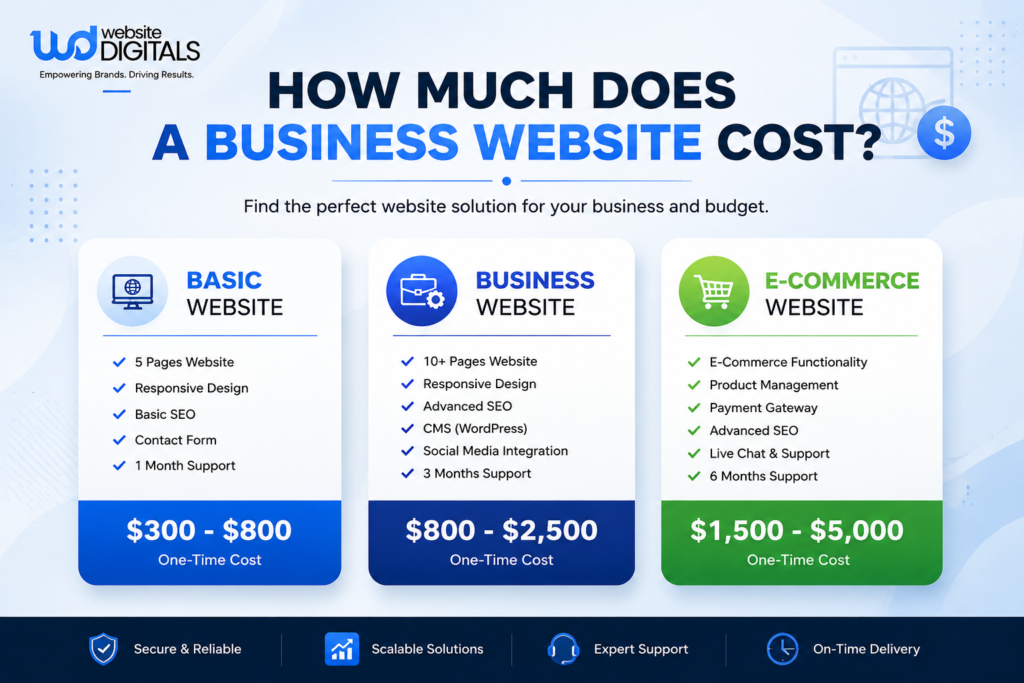
- How Much Does a Business Website Cost
- Best Website Features for Small Businesses
- Website Development Process Step-by-Step
- Types of Websites
- Web Design Trends 2026
- Mobile-Responsive Design Guide
- Website Maintenance Checklist
- How to Choose a Web Development Agency
- Website Speed Optimization Guide
Comparing Your Options at a Glance
[Insert Image 2 here]
| Approach | Typical Cost (USD) | Time to Launch | Best For |
| AI/DIY website builder (Wix, Squarespace) | $0–$300 setup + monthly plan | Hours to a few days | Testing an idea, very tight budget |
| WordPress (self-managed) | $200–$1,500 | 1–3 weeks | Content-heavy sites, hands-on owners |
| WordPress (professionally built) | $500–$3,000 | 2–5 weeks | Most small businesses |
| Custom-coded website | $750–$8,000+ | 4–10 weeks | Unique functionality, performance-critical sites |
| E-commerce store | $1,000–$8,000+ | 4–10 weeks | Businesses selling products online |
What is Website Development?
Website development is the actual work of building a functioning website everything from the visual layout down to the code that makes buttons, forms, and pages work the way they’re supposed to. It’s often confused with web design, but they’re not the same thing: design decides how a site looks and feels, development is what makes it actually run in a browser.
When we talk about a development project for a website it usually involves a few different parts. The front-end work is what people see when they visit the website. It is what they interact with. Then there is the back-end work, which includes things like databases and server logic this is basically everything that is running behind the scenes. Nowadays development projects also include integration work this means connecting the website to things like a CRM, a payment processor or a marketing tool.
For small businesses this makes a big difference. It is the difference between having a website that just shows some information and a website that can actually do things like capture leads, process payments or book appointments on its own. A modern development project like this can really help businesses, like the development project, for a website that uses a CRM or a payment processor.
Read the full guide: What is Website Development?
Why Every Small Business Needs a Website in 2026
A large share of small business owners without a website say it’s because they don’t think it’s relevant to their industry and that assumption is one of the more expensive mistakes a business can make today. Customers research before they call, compare before they visit, and quietly rule businesses out for looking unreachable online, long before anyone picks up a phone.
A website is also the one digital asset a business fully owns. Social media reach depends on a platform’s algorithm changing its mind at any time; a website is yours, permanently, and it’s still the place most customers go to verify a business is legitimate before doing anything else.
Read the full guide: Why Every Small Business Needs a Website in 2026
WordPress vs Custom Website
WordPress powers a huge share of the entire internet, and for most small businesses, it’s the practical default — fast to launch, easy for non-technical staff to manage, and backed by a massive plugin ecosystem for almost anything you’d want to add. Custom-coded sites cost more and take longer, but they tend to load faster and scale more cleanly once a business’s needs go beyond what a CMS was originally built for.
Neither is objectively “better” the right one depends on how much content your team manages directly, how custom your functionality needs to be, and how fast you need to launch.
Read the full guide: WordPress vs Custom Website
How Much Does a Business Website Cost
Pricing depends far more on scope than most business owners expect going in — the number of genuinely unique page layouts, how much custom functionality is involved, and whether content and photography are part of the project or left for the client to supply. A basic, professionally built small business site typically lands in the low thousands; e-commerce and custom functionality push that number up from there.
The businesses that end up happiest with what they paid aren’t the ones who found the cheapest quote they’re the ones who understood exactly what was included before they signed.
Read the full guide: How Much Does a Business Website Cost
Best Website Features for Small Businesses
When you are making a website, not every feature that looks really cool is actually going to help someone become a customer. The features that really work are the ones: the website loads quickly it is easy to see what to do next it looks good on your phone it is easy to get in touch or make a booking and you can see what other people think of the business.
Businesses that try to put many things on their website at the same time usually end up with a website that is slow and hard to use instead of one that just does a few things really well like fast load times and a simple contact form. That is what websites should be about making it easy for customers to use the website and trust the business like when you see reviews or client logos, on the website.
Read the full guide: Best Website Features for Small Businesses
Website Development Process Step-by-Step
A website project runs smoothly when it follows an order.
The steps are:
- discovery and planning
- wireframing
- visual design
- development
- adding content
- testing
- and launch.
If you skip or rush any of these steps discovery your project may need to be rebuilt within a year. When you know these steps you can see where delays are happening. It’s usually not the coding thats the problem. Most delays come from waiting for content, feedback or decisions. The discovery step is especially important. It helps you plan and prepare for the rest of the project. If you take the time to do each step right your website project is more likely to succeed. You will be able to launch a website that meets your needs and works well. A planned website project helps you avoid problems later on. It also helps you understand where things might go wrong.
Read the full guide: Website Development Process Step-by-Step
Types of Websites
When someone says they need a website it can mean a lot of things. This is because it really depends on the business. For instance a business website is not the same as a store website. A portfolio website is also different from a landing page website. Each type of website is used for purposes and they are all made in different ways. If you start by telling someone you want a website without knowing what type of website you really need this can be a mistake. It can cost you a lot of money.
So it is an idea to figure out what kind of website you really need before you ask someone to give you a price for a website. Knowing what kind of website you need makes everything go faster when you do ask for a price. It also costs you money, for your website.
Read the full guide: Types of Websites (Business, E-commerce, Portfolio, Landing Page)
Web Design Trends 2026
Some trends in 2026 are really good to use. For example making websites work well on phones using artificial intelligence to help people find what they want and making sure websites are easy for everyone to use. These things can make a difference in how people look at a website and how search engines rank it.
The companies that are getting the most out of these design trends are picking and choosing which ones to use, based on what their visitors actually need. They are not just using a trend because it is popular this year. They are using 2026 trends, like mobile- layouts and accessibility-first design in a way that makes sense for their website and their visitors.
Read the full guide: Web Design Trends 2026
Mobile-Responsive Design Guide
Mobile devices now account for more than half of all web traffic, which makes mobile-responsive design a baseline requirement, not an optional upgrade. A site that “technically works” on a phone but wasn’t actually designed for one is quietly losing conversions its owner never traces back to the real cause.
Getting a website right is really important. It affects how people use the website and how search engines like Google rank the website. The website being mobile friendly is now a factor in search rankings, for the website.
Read the full guide: Mobile-Responsive Design Guide
Website Maintenance Checklist
When you launch a website the website is not really done. The website needs things like updates for the plugins and the backups have to work when you test them. The certificates for the website will expire after a time and this happens no matter what. If you do not do the maintenance for the website it does not mean you will save money. It just means you will have to pay for it when something goes wrong with the website at a very bad time.
You need to have a list of things to check on a basis to keep the website working properly. This list is the difference between doing maintenance that really helps prevent problems with the website and just setting up automated tasks for the website with no one checking to make sure everything is okay, with the website.
Read the full guide: Website Maintenance Checklist
How to Choose a Web Development Agency
Some businesses are really happy, with the agency they choose. This is because they took the time to check things out before they signed anything. They looked at examples of the agencys work not just pictures. They made sure they knew what they were paying for with a list of all the costs. They also found out who would own the work they did together once the project was finished.
One thing that should make you cautious is if an agency starts designing things without asking you about what you want to achieve with your business.
Read the full guide: How to Choose a Web Development Agency
Website Speed Optimization Guide
Page speed affects how well a website converts visitors into customers. A page that loads in one second does much better, than one that takes four seconds. Every extra second of delay hurts website rankings and earnings.
- Image optimization helps
- Clean code is important
- Proper hosting is also crucial
These fixes can be done without rebuilding the website.
For most small business sites, speed is one of the highest-return, lowest-effort improvements available.
Read the full guide: Website Speed Optimization Guide
Thinking About Getting Started?
If you’ve read this far, you already understand more about how website projects actually work than most business owners do before their first quote. The next step is turning that into an actual plan for your business what you need, what it should cost, and how long it should realistically take.
GrowthLayerX works with businesses across Pakistan and internationally on exactly this kind of project. If you’d like an honest read on what your website needs, get in touch for a free consultation no pressure, just a clear starting point.
Conclusion
A website is one of the few business assets that keeps working after everyone’s gone home for the day, and the gap between a site that quietly helps a business and one that just sits there almost always comes down to the decisions covered in this guide the platform, the process, the ongoing care after launch. Use the twelve linked guides above to go deeper on whatever decision is in front of you right now, and treat this page as your reference point as you move through the rest of the process.